

Gaming · 3D design
Roblox Clothing Designer
Roblox clothing is authored on a flat UV template — an unwrapped sheet of panels that looks nothing like a garment. You paint a rectangle and hope the collar lands right.
- Android
- iOS
- Mobile App Development
- Firebase
- API Integration
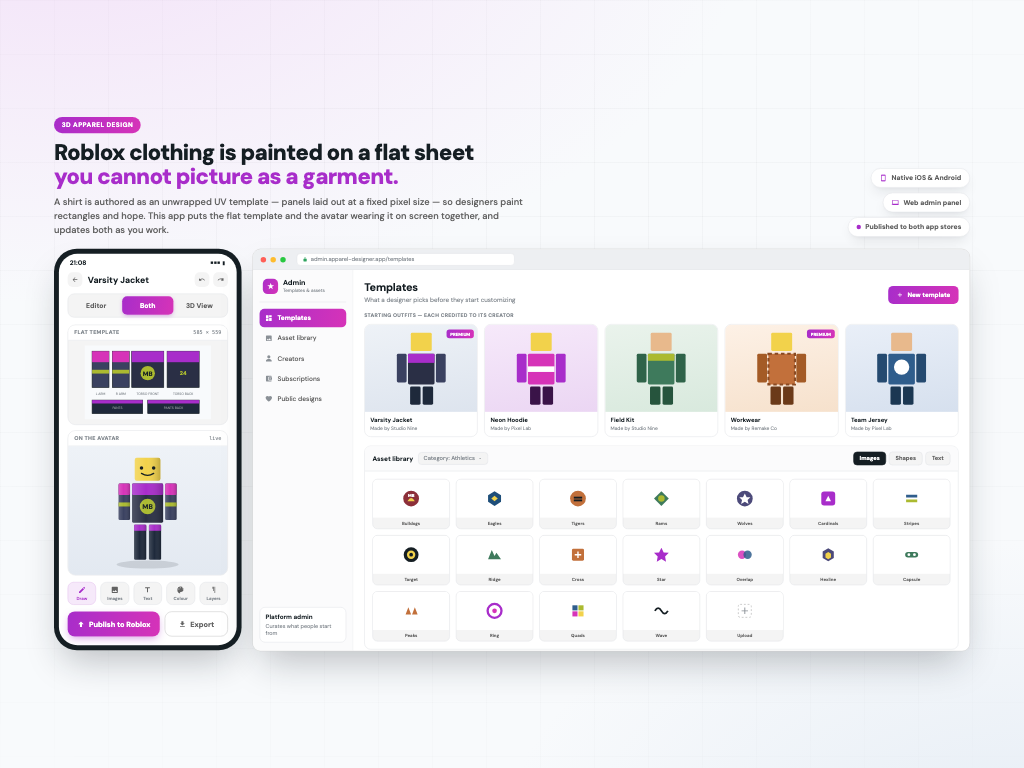
Roblox clothing is authored on a flat UV template — an unwrapped sheet of panels that looks nothing like a garment. You paint a rectangle and hope the collar lands right. This app renders it on the character as you work. A three-way toggle switches between the flat template, the avatar wearing it in 3D, and both side by side. Layers stack per body part — undershirt, tie, jacket, text — reorderable by drag. Colours can be pulled from the design's own palette. Finished work publishes straight to Roblox, or exports as a zip. Design, native iOS, native Android and a web admin panel.
The problem this exists to solve
Roblox shirts and trousers are authored as a flat UV template — an unwrapped sheet of panels at a fixed pixel size, 585 by 559. It looks nothing like a garment. You paint a rectangle and hope the collar lands in the right place, upload it, and find out.
This app closes that gap. A three-way toggle above the canvas switches between Editor, the flat template with its panels unwrapped; 3D View, the same design rendered on a Roblox avatar; and Both, which puts them side by side and updates the body as you paint the sheet.
That third mode is the whole product. Everything else in the app exists to make it worth having.
Behind it sits a web admin panel where the platform curates the starting templates and the stock artwork library that designers pull from.
Layers, split by body part
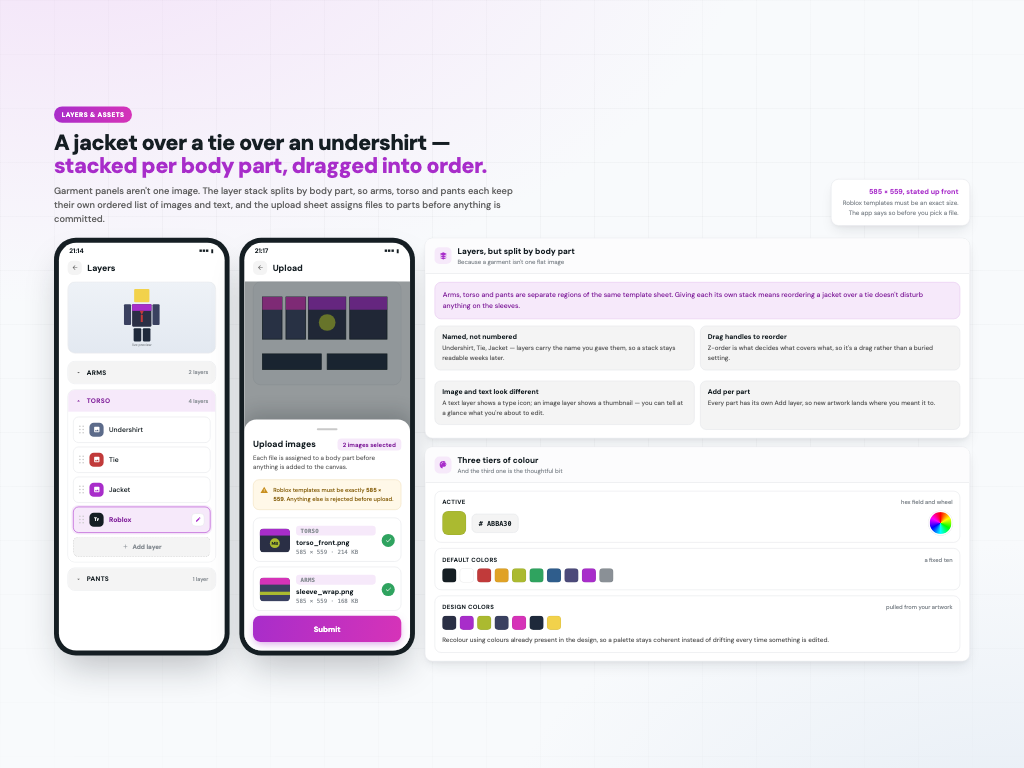
A garment isn't one image. Arms, torso and pants are separate regions of the same template sheet, so the layer panel splits into ARMS, TORSO and PANTS, and each keeps its own ordered stack.
Open Torso and it reads: Undershirt, Tie, Jacket, and a text layer — each named, each with a drag handle to reorder, and image layers visually distinct from text layers. Add layer sits under every part, so new artwork lands where you meant it.
Uploading knows where things go too. The sheet reports how many images are selected and lists each one already assigned to a body part before anything is committed, and it states the required 585 by 559 up front rather than rejecting a file after the fact.
Colour works in three tiers: an ACTIVE colour with a hex field and a wheel, a fixed set of DEFAULT COLORS, and DESIGN COLORS — the palette harvested from the artwork you are already working on, so recolouring keeps a design coherent instead of drifting.
Text stays editable, and there's art to start from
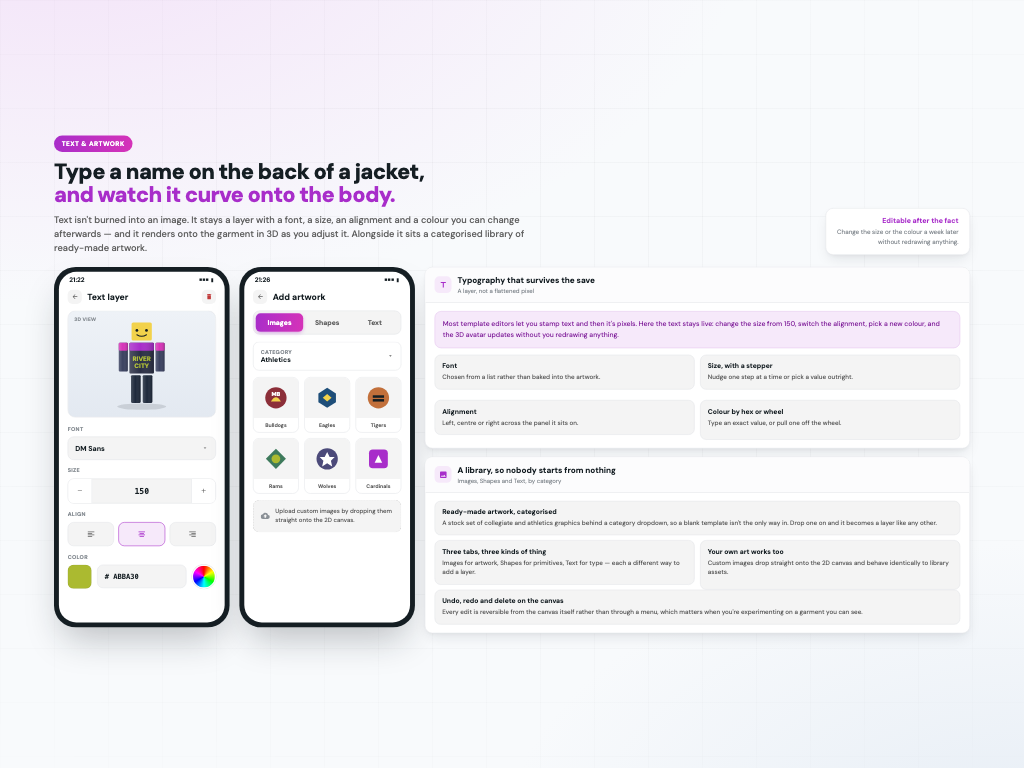
Text isn't stamped into the image. It stays a layer with a font, a size adjustable by stepper, an alignment and a colour — all changeable afterwards, with the 3D avatar updating as you go. Type a name across the back of a jacket and watch it sit on the body.
Alongside it is a categorised library of ready-made graphics behind Images, Shapes and Text tabs with a category dropdown, so a blank template isn't the only way in. Custom artwork drops straight onto the 2D canvas and behaves exactly like a library asset.
Undo, redo and delete live on the canvas itself, which matters when you're experimenting on something you can see.
A draft and a finished design are different things
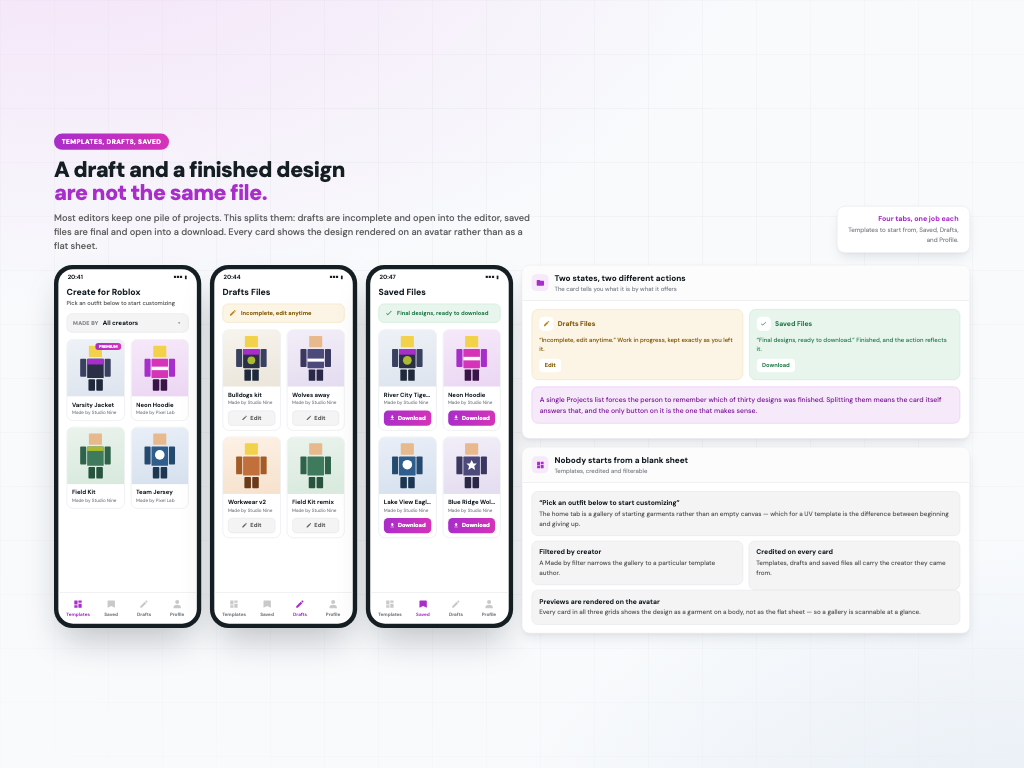
Most editors keep one pile of projects and leave you to remember which of thirty was finished. This splits them, and the card tells you which is which by what it offers.
Drafts Files reads “Incomplete, edit anytime” and every card carries Edit. Saved Files reads “Final designs, ready to download” and every card carries Download. One state, one action, no ambiguity.
Both grids show the design rendered on an avatar rather than as a flat sheet, so a gallery is scannable at a glance — and each card is credited to the creator whose template it came from.
The home tab is a gallery rather than an empty canvas: “Create for Roblox — pick an outfit below to start customizing”, with a Made by filter to narrow it to a particular template author. Four tabs in total: Templates, Saved, Drafts, Profile.
Two ways out, and how it earns
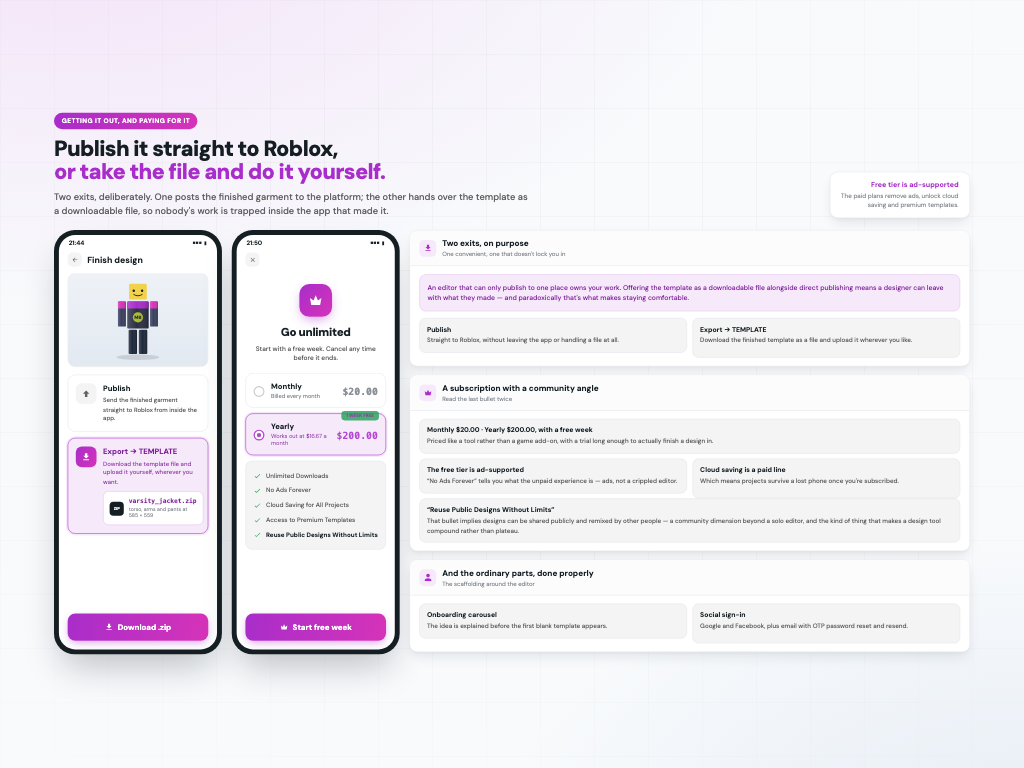
There are two exits, deliberately. Publish sends the finished garment straight to Roblox without leaving the app. Export hands over the template as a downloadable file, so nobody's work is trapped inside the tool that made it — and paradoxically that is what makes staying comfortable.
The business model is a subscription: $20.00 monthly or $200.00 yearly with a free one-week trial. The bullets are Unlimited Downloads, No Ads Forever, Cloud Saving for All Projects, Access to Premium Templates, and Reuse Public Designs Without Limits.
Two of those are worth reading twice. “No Ads Forever” tells you the free tier is ad-supported rather than a crippled editor. And “Reuse Public Designs Without Limits” implies designs can be shared publicly and remixed by other people — a community dimension beyond a solo editor.
Around all of it: an onboarding carousel, social sign-in with Google and Facebook, OTP password reset with resend, card payment and account details.
Delivered on one contract: UI design, a native iOS app, a native Android app and a web admin panel, over Firebase. The design came from a designer on my team — I led the delivery; I didn't draw the screens. Built and published to both app stores. Client work, so the source is private.